Adverts
-
mattsupport
- Posts: 6
- Joined: 2012-03-27 10:06
Adverts
I have been tasked with getting rid of the toper most advert when the autentication is rejected. i know you can change this via the spanners at the top of the screen when your logged on, but we need to deploy it with htis off already. any ideas?

Re: Adverts
1) command line -disablesponsor
2) registry HKCU\\Software\\ORL\\VNCviewer\\Settings\\sponsor
3) Or via the option panel
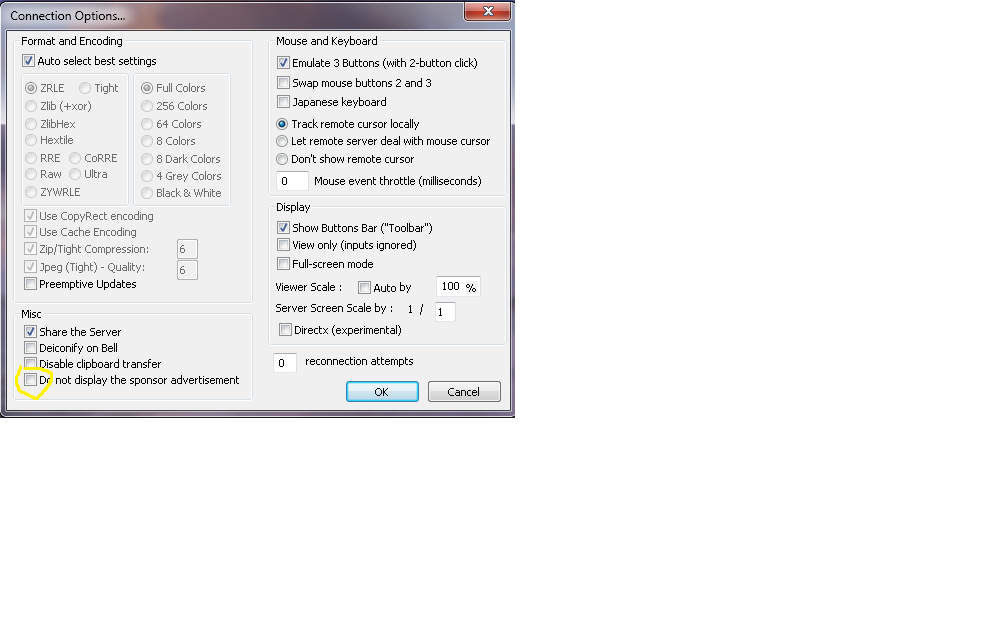
2) registry HKCU\\Software\\ORL\\VNCviewer\\Settings\\sponsor
3) Or via the option panel
UltraVNC links (join us on social networks):
- Website: https://uvnc.com/
- Forum: https://forum.uvnc.com/
- GitHub sourcecode: https://github.com/ultravnc/UltraVNC
- Mastodon: https://mastodon.social/@ultravnc
- Bluesky/AT Protocol: https://bsky.app/profile/ultravnc.bsky.social
- Facebook: https://www.facebook.com/ultravnc1
- X/Twitter: https://x.com/ultravnc1
- Reddit community: https://www.reddit.com/r/ultravnc
- OpenHub: https://openhub.net/p/ultravnc
- uvnc2me: https://uvnc2me.com/
- Website: https://uvnc.com/
- Forum: https://forum.uvnc.com/
- GitHub sourcecode: https://github.com/ultravnc/UltraVNC
- Mastodon: https://mastodon.social/@ultravnc
- Bluesky/AT Protocol: https://bsky.app/profile/ultravnc.bsky.social
- Facebook: https://www.facebook.com/ultravnc1
- X/Twitter: https://x.com/ultravnc1
- Reddit community: https://www.reddit.com/r/ultravnc
- OpenHub: https://openhub.net/p/ultravnc
- uvnc2me: https://uvnc2me.com/
-
mattsupport
- Posts: 6
- Joined: 2012-03-27 10:06
Re: Adverts
this doesnt seem to work for us, we deployed it and its there until we edit the option once we have remoted onto a machine once. any advice, also the Reg string does not exist!
Re: Adverts
It works on my site using
1) starting vncviewer.exe -disablesponsor
2)[HKEY_CURRENT_USER\Software\ORL\VNCviewer\Settings]
"sponsor"=dword:00000001
3)gui
1) starting vncviewer.exe -disablesponsor
2)[HKEY_CURRENT_USER\Software\ORL\VNCviewer\Settings]
"sponsor"=dword:00000001
3)gui
UltraVNC links (join us on social networks):
- Website: https://uvnc.com/
- Forum: https://forum.uvnc.com/
- GitHub sourcecode: https://github.com/ultravnc/UltraVNC
- Mastodon: https://mastodon.social/@ultravnc
- Bluesky/AT Protocol: https://bsky.app/profile/ultravnc.bsky.social
- Facebook: https://www.facebook.com/ultravnc1
- X/Twitter: https://x.com/ultravnc1
- Reddit community: https://www.reddit.com/r/ultravnc
- OpenHub: https://openhub.net/p/ultravnc
- uvnc2me: https://uvnc2me.com/
- Website: https://uvnc.com/
- Forum: https://forum.uvnc.com/
- GitHub sourcecode: https://github.com/ultravnc/UltraVNC
- Mastodon: https://mastodon.social/@ultravnc
- Bluesky/AT Protocol: https://bsky.app/profile/ultravnc.bsky.social
- Facebook: https://www.facebook.com/ultravnc1
- X/Twitter: https://x.com/ultravnc1
- Reddit community: https://www.reddit.com/r/ultravnc
- OpenHub: https://openhub.net/p/ultravnc
- uvnc2me: https://uvnc2me.com/