Some notes first:
I have a triple display setup (server side)
Left 1280x1024
Middle 1920x1200
Right 1680x1050
OS of server: Windows 7 Pro x64
Mirror driver version 1.22 Vista x64
UVNC server versions tried:
1.0.8.0 both 32 and 64, 1.0.8.2 both 32 and 64, 1.0.6.5 only 32 so far (since it works fine)
Clients tried: 1.0.8.0, 1.0.8.2, all in both 32 and 64 versions plus Java versions. Also I tried the 32 bit versions using wine under Ubuntu. However the client version used never made a difference (expect for the usual limitations of the Java viewer).
I am not entirely sure exactly what the problem here is, but when I used 1.0.8.0 after installing Windows 7, I could only use the leftmost 1920x1200 of my displays, ie all of my left display plus part of the middle one. Trying to switch displays on the client side (select full desktop/switch monitor) resulted in the client crashing.
I upgraded the server to 1.0.8.2 after reading about some problems, but here another problem presented: I can view the entire desktop area, but the mouse cursor on the server side is stuck on the left side. I can move it up or down, but it's always stuck to the left. This also occurred using the Java viewer.
In the end, I downgraded to 1.0.6.5 (32 bit) on the server side and now things work just fine.
So in essence, I don't have a problem I need solved right now, since an old version works fine, but since I didn't see anyone else post such a problem and I might want to use future versions, I thought I'd let you know about it/ask me questions pertaining to my problem(s).
After more 2 000 000 (two million) views on forum for 1.5.0.x development versions... and 1.6.1.0, 1.6.3.0-dev versions
A new stable version, UltraVNC 1.6.4.0 and UltraVNC SC 1.6.4.0 have been released: https://forum.uvnc.com/viewtopic.php?t=38095
Feedback is always welcome
2026-04-01: After 1.7.x, 1.8.x release builds need tests and feedback: https://forum.uvnc.com/viewtopic.php?t=38158
2026-03-11: CVE-2026-3787 and CVE-2026-4962 - Clarification: https://forum.uvnc.com/viewtopic.php?t=38155
2025-12-02: We need help: English Wikipedia UltraVNC page has been requested to deletion: https://forum.uvnc.com/viewtopic.php?t=38127
Any help is welcome to improve the UltraVNC page and/or to comment on the Wikipedia Talk page
2025-05-06: Forum password change request: https://forum.uvnc.com/viewtopic.php?t=38078
2023-09-21: Important: Please update to latest version before to create a reply, a topic or an issue: https://forum.uvnc.com/viewtopic.php?t=37864
Development: UltraVNC development is always here... Any help is welcome
Feedback is welcome
Help is very needed for:
Windows ARM/ARM64 support: https://forum.uvnc.com/viewtopic.php?t=38163 / https://github.com/ultravnc/UltraVNC/issues/346
macOS support: https://forum.uvnc.com/viewtopic.php?t=38164 / https://github.com/ultravnc/UltraVNC/issues/347
Linux support: https://forum.uvnc.com/viewtopic.php?t=38165 / https://github.com/ultravnc/UltraVNC/issues/348
*BSD support: https://forum.uvnc.com/viewtopic.php?t=38166 / https://github.com/ultravnc/UltraVNC/issues/349
*Solaris support: https://forum.uvnc.com/viewtopic.php?t=38167 / https://github.com/ultravnc/UltraVNC/issues/350
A new stable version, UltraVNC 1.6.4.0 and UltraVNC SC 1.6.4.0 have been released: https://forum.uvnc.com/viewtopic.php?t=38095
Feedback is always welcome
2026-04-01: After 1.7.x, 1.8.x release builds need tests and feedback: https://forum.uvnc.com/viewtopic.php?t=38158
2026-03-11: CVE-2026-3787 and CVE-2026-4962 - Clarification: https://forum.uvnc.com/viewtopic.php?t=38155
2025-12-02: We need help: English Wikipedia UltraVNC page has been requested to deletion: https://forum.uvnc.com/viewtopic.php?t=38127
Any help is welcome to improve the UltraVNC page and/or to comment on the Wikipedia Talk page
2025-05-06: Forum password change request: https://forum.uvnc.com/viewtopic.php?t=38078
2023-09-21: Important: Please update to latest version before to create a reply, a topic or an issue: https://forum.uvnc.com/viewtopic.php?t=37864
Development: UltraVNC development is always here... Any help is welcome
Feedback is welcome
Help is very needed for:
Windows ARM/ARM64 support: https://forum.uvnc.com/viewtopic.php?t=38163 / https://github.com/ultravnc/UltraVNC/issues/346
macOS support: https://forum.uvnc.com/viewtopic.php?t=38164 / https://github.com/ultravnc/UltraVNC/issues/347
Linux support: https://forum.uvnc.com/viewtopic.php?t=38165 / https://github.com/ultravnc/UltraVNC/issues/348
*BSD support: https://forum.uvnc.com/viewtopic.php?t=38166 / https://github.com/ultravnc/UltraVNC/issues/349
*Solaris support: https://forum.uvnc.com/viewtopic.php?t=38167 / https://github.com/ultravnc/UltraVNC/issues/350
[fix] Windows 7 x64, multi monitor, issues (in this version)
[fix] Windows 7 x64, multi monitor, issues (in this version)
Last edited by Iasius on 2010-09-09 18:16, edited 5 times in total.

Re: Windows 7 x64, multi monitor, issues (in this version)
What are the monitor coordinates
Something like
(0,0)(1024,0)(2048,0)
mouse problem
does it happen with all modes
( prim/sec/all)
I don't have a 3 monitor setup to test. Can you verify if it also happen
with a 2 monitor setup... possible related to the positioning agains the primary (0,0) monitor.
Thanks
Something like
(0,0)(1024,0)(2048,0)
mouse problem
does it happen with all modes
( prim/sec/all)
I don't have a 3 monitor setup to test. Can you verify if it also happen
with a 2 monitor setup... possible related to the positioning agains the primary (0,0) monitor.
Thanks
UltraVNC links (join us on social networks):
- Website: https://uvnc.com/
- Forum: https://forum.uvnc.com/
- GitHub sourcecode: https://github.com/ultravnc/UltraVNC
- Mastodon: https://mastodon.social/@ultravnc
- Bluesky/AT Protocol: https://bsky.app/profile/ultravnc.bsky.social
- Facebook: https://www.facebook.com/ultravnc1
- X/Twitter: https://x.com/ultravnc1
- Reddit community: https://www.reddit.com/r/ultravnc
- OpenHub: https://openhub.net/p/ultravnc
- uvnc2me: https://uvnc2me.com/
- Website: https://uvnc.com/
- Forum: https://forum.uvnc.com/
- GitHub sourcecode: https://github.com/ultravnc/UltraVNC
- Mastodon: https://mastodon.social/@ultravnc
- Bluesky/AT Protocol: https://bsky.app/profile/ultravnc.bsky.social
- Facebook: https://www.facebook.com/ultravnc1
- X/Twitter: https://x.com/ultravnc1
- Reddit community: https://www.reddit.com/r/ultravnc
- OpenHub: https://openhub.net/p/ultravnc
- uvnc2me: https://uvnc2me.com/
Re: Windows 7 x64, multi monitor, issues (in this version)
I suppose the easiest way to show the monitor setup is a picture:
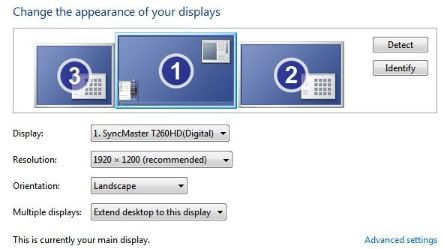
I'm not sure what coordinates that would translate to.
Monitor #1 and #2 are connected to my first video card, #3 is connected to the second card. Maybe this will tell you something: Using 1.0.6.5, when I connect, I see the #3 plus parts of #1 as described, clicking switch monitor once switches to #3 only, clicking that again switches to the entire desktop area (3+1+2). On the next click, it's #1 only, followed by #3 only and then the entire desktop again.
Seems weird.
With the Java viewer I always have to select Ignore or Disable for "Cursor Shape Updates", or I get a "Error: Framebuffer update rectangle too large". However that error is present with all versions I've used so far and easily fixable with that different setting for cursor shape updates.
The first window size I get using either the vncviewer.exe or the Java viewer is 1920x1200, but it shows the display #3 and part of display #1 first. That's irrespective of versions. It was just in version 1.0.8.0 that the vncviewer.exe would crash upon "full desktop/switch monitor". That doesn't happen in either the earlier or later versions.
As for the mouse modes, I suppose you're referring to "track remote cursor locally", "let remote server ..." etc? If so, that made no difference with the 1.0.8.2 problem. I could move the client side mouse cursor just fine (obviously :-)), but the remote cursor would stay at the left side of display #3 and "flicker" if I move the client side mouse, moving up or down with it, but always staying at the far left.
Regarding the possible differences in a two display setup, I'll test that tomorrow since I would have to reinstall a different UltraVNC version for it and that has to wait a few hours. It's a bit tricky to do that remotely.... ;-)
I'm not sure what coordinates that would translate to.
Monitor #1 and #2 are connected to my first video card, #3 is connected to the second card. Maybe this will tell you something: Using 1.0.6.5, when I connect, I see the #3 plus parts of #1 as described, clicking switch monitor once switches to #3 only, clicking that again switches to the entire desktop area (3+1+2). On the next click, it's #1 only, followed by #3 only and then the entire desktop again.
Seems weird.
With the Java viewer I always have to select Ignore or Disable for "Cursor Shape Updates", or I get a "Error: Framebuffer update rectangle too large". However that error is present with all versions I've used so far and easily fixable with that different setting for cursor shape updates.
The first window size I get using either the vncviewer.exe or the Java viewer is 1920x1200, but it shows the display #3 and part of display #1 first. That's irrespective of versions. It was just in version 1.0.8.0 that the vncviewer.exe would crash upon "full desktop/switch monitor". That doesn't happen in either the earlier or later versions.
As for the mouse modes, I suppose you're referring to "track remote cursor locally", "let remote server ..." etc? If so, that made no difference with the 1.0.8.2 problem. I could move the client side mouse cursor just fine (obviously :-)), but the remote cursor would stay at the left side of display #3 and "flicker" if I move the client side mouse, moving up or down with it, but always staying at the far left.
Regarding the possible differences in a two display setup, I'll test that tomorrow since I would have to reinstall a different UltraVNC version for it and that has to wait a few hours. It's a bit tricky to do that remotely.... ;-)
Last edited by Iasius on 2009-12-10 02:00, edited 4 times in total.
Re: Windows 7 x64, multi monitor, issues (in this version)
Please check also if the screen order is related to the bug.
(1) is the primary display and topleft is always (0,0), if you place the (1) as most left screen (2) and (3) have also positive coordinates.
Do you scale the screen on the viewer site? Could also be the cause of the bug.
(1) is the primary display and topleft is always (0,0), if you place the (1) as most left screen (2) and (3) have also positive coordinates.
Do you scale the screen on the viewer site? Could also be the cause of the bug.
UltraVNC links (join us on social networks):
- Website: https://uvnc.com/
- Forum: https://forum.uvnc.com/
- GitHub sourcecode: https://github.com/ultravnc/UltraVNC
- Mastodon: https://mastodon.social/@ultravnc
- Bluesky/AT Protocol: https://bsky.app/profile/ultravnc.bsky.social
- Facebook: https://www.facebook.com/ultravnc1
- X/Twitter: https://x.com/ultravnc1
- Reddit community: https://www.reddit.com/r/ultravnc
- OpenHub: https://openhub.net/p/ultravnc
- uvnc2me: https://uvnc2me.com/
- Website: https://uvnc.com/
- Forum: https://forum.uvnc.com/
- GitHub sourcecode: https://github.com/ultravnc/UltraVNC
- Mastodon: https://mastodon.social/@ultravnc
- Bluesky/AT Protocol: https://bsky.app/profile/ultravnc.bsky.social
- Facebook: https://www.facebook.com/ultravnc1
- X/Twitter: https://x.com/ultravnc1
- Reddit community: https://www.reddit.com/r/ultravnc
- OpenHub: https://openhub.net/p/ultravnc
- uvnc2me: https://uvnc2me.com/
-
bumforaliving
- 8

- Posts: 14
- Joined: 2009-12-10 13:38
Re: Windows 7 x64, multi monitor, issues (in this version)
I have a similar issue with dual monitors on windows xp. I also have a reverse order; Left monitor is #2 portrait, Right is #1 landscape. Was fine with 1.0.8.0 but when upgraded to this version, mouse will only stay along the left side of monitor #2 no matter if I am accessing #1 or #2.
Re: Windows 7 x64, multi monitor, issues (in this version)
There where a lot of crashes caused by the mouse positioning.
Some extra check was added together with the "non driver" multi
monitor support.... seems we block some mouse updates that should
be enabled.
For next update the multi-monitor part require a full review.
Some extra check was added together with the "non driver" multi
monitor support.... seems we block some mouse updates that should
be enabled.
For next update the multi-monitor part require a full review.
UltraVNC links (join us on social networks):
- Website: https://uvnc.com/
- Forum: https://forum.uvnc.com/
- GitHub sourcecode: https://github.com/ultravnc/UltraVNC
- Mastodon: https://mastodon.social/@ultravnc
- Bluesky/AT Protocol: https://bsky.app/profile/ultravnc.bsky.social
- Facebook: https://www.facebook.com/ultravnc1
- X/Twitter: https://x.com/ultravnc1
- Reddit community: https://www.reddit.com/r/ultravnc
- OpenHub: https://openhub.net/p/ultravnc
- uvnc2me: https://uvnc2me.com/
- Website: https://uvnc.com/
- Forum: https://forum.uvnc.com/
- GitHub sourcecode: https://github.com/ultravnc/UltraVNC
- Mastodon: https://mastodon.social/@ultravnc
- Bluesky/AT Protocol: https://bsky.app/profile/ultravnc.bsky.social
- Facebook: https://www.facebook.com/ultravnc1
- X/Twitter: https://x.com/ultravnc1
- Reddit community: https://www.reddit.com/r/ultravnc
- OpenHub: https://openhub.net/p/ultravnc
- uvnc2me: https://uvnc2me.com/
Re: Windows 7 x64, multi monitor, issues (in this version)
I won't be able to test this today unfortunately, but I hope to be able to do this by/on the weekend.
You've said that the next version already requires a full review, but I hope I can provide you with some hints during my tests.
Specifically, I'll test versions 1.0.8.0 and 1.0.8.2 regarding a two/three monitor setup and the placement of those displays.
All I can answer so far is that client side scaling was always set to 100% in my tests so far, (I always leave server side scaling at 1:1). I'll try and see whether client or server side scaling makes a difference. My suspicion is however that it's a server-side problem.
I also want to take this opportunity to thank you for your efforts in developing UltraVNC. Personally, I mainly use FORTRAN to solve physics problems, so I can't exactly help you on that side.
You've said that the next version already requires a full review, but I hope I can provide you with some hints during my tests.
Specifically, I'll test versions 1.0.8.0 and 1.0.8.2 regarding a two/three monitor setup and the placement of those displays.
All I can answer so far is that client side scaling was always set to 100% in my tests so far, (I always leave server side scaling at 1:1). I'll try and see whether client or server side scaling makes a difference. My suspicion is however that it's a server-side problem.
I also want to take this opportunity to thank you for your efforts in developing UltraVNC. Personally, I mainly use FORTRAN to solve physics problems, so I can't exactly help you on that side.
Last edited by Iasius on 2009-12-10 16:34, edited 3 times in total.
Re: Windows 7 x64, multi monitor, issues (in this version)
Please test this new winvnc.exe, possible it was just a <0 check that needed to be replaced by < left
- x86: https://uvnc.eu/download/winvnc_10832_leftdisplay.zip
- x64: https://uvnc.eu/download/winvnc_10832_l ... ay_x64.zip
- x86: https://uvnc.eu/download/winvnc_10832_leftdisplay.zip
- x64: https://uvnc.eu/download/winvnc_10832_l ... ay_x64.zip
UltraVNC links (join us on social networks):
- Website: https://uvnc.com/
- Forum: https://forum.uvnc.com/
- GitHub sourcecode: https://github.com/ultravnc/UltraVNC
- Mastodon: https://mastodon.social/@ultravnc
- Bluesky/AT Protocol: https://bsky.app/profile/ultravnc.bsky.social
- Facebook: https://www.facebook.com/ultravnc1
- X/Twitter: https://x.com/ultravnc1
- Reddit community: https://www.reddit.com/r/ultravnc
- OpenHub: https://openhub.net/p/ultravnc
- uvnc2me: https://uvnc2me.com/
- Website: https://uvnc.com/
- Forum: https://forum.uvnc.com/
- GitHub sourcecode: https://github.com/ultravnc/UltraVNC
- Mastodon: https://mastodon.social/@ultravnc
- Bluesky/AT Protocol: https://bsky.app/profile/ultravnc.bsky.social
- Facebook: https://www.facebook.com/ultravnc1
- X/Twitter: https://x.com/ultravnc1
- Reddit community: https://www.reddit.com/r/ultravnc
- OpenHub: https://openhub.net/p/ultravnc
- uvnc2me: https://uvnc2me.com/
-
bumforaliving
- 8
- Posts: 14
- Joined: 2009-12-10 13:38
Re: Windows 7 x64, multi monitor, issues (in this version)
This version did not fix the issue I see. Mouse will only move top 3rd of left most side of the left monitor (#2).
Re: Windows 7 x64, multi monitor, issues (in this version)
Updates test files:
- x86: https://uvnc.eu/download/winvnc_10832_leftdisplay.zip
- x64: https://uvnc.eu/download/winvnc_10832_l ... ay_x64.zip
tested with 2 monitors (left/right of primary) and with and without driver
not tested with 3 monitors
Changes:
- Switch (primary/all) only 2 positions
It is not longer possible to select the secondary alone. Don't get it stable with this option.
- x86: https://uvnc.eu/download/winvnc_10832_leftdisplay.zip
- x64: https://uvnc.eu/download/winvnc_10832_l ... ay_x64.zip
tested with 2 monitors (left/right of primary) and with and without driver
not tested with 3 monitors
Changes:
- Switch (primary/all) only 2 positions
It is not longer possible to select the secondary alone. Don't get it stable with this option.
UltraVNC links (join us on social networks):
- Website: https://uvnc.com/
- Forum: https://forum.uvnc.com/
- GitHub sourcecode: https://github.com/ultravnc/UltraVNC
- Mastodon: https://mastodon.social/@ultravnc
- Bluesky/AT Protocol: https://bsky.app/profile/ultravnc.bsky.social
- Facebook: https://www.facebook.com/ultravnc1
- X/Twitter: https://x.com/ultravnc1
- Reddit community: https://www.reddit.com/r/ultravnc
- OpenHub: https://openhub.net/p/ultravnc
- uvnc2me: https://uvnc2me.com/
- Website: https://uvnc.com/
- Forum: https://forum.uvnc.com/
- GitHub sourcecode: https://github.com/ultravnc/UltraVNC
- Mastodon: https://mastodon.social/@ultravnc
- Bluesky/AT Protocol: https://bsky.app/profile/ultravnc.bsky.social
- Facebook: https://www.facebook.com/ultravnc1
- X/Twitter: https://x.com/ultravnc1
- Reddit community: https://www.reddit.com/r/ultravnc
- OpenHub: https://openhub.net/p/ultravnc
- uvnc2me: https://uvnc2me.com/
-
bumforaliving
- 8
- Posts: 14
- Joined: 2009-12-10 13:38
Re: Windows 7 x64, multi monitor, issues (in this version)
That did the trick, thank you!
Re: [fix] Windows 7 x64, multi monitor, issues (in this vers
thank you.
this did the trick for me aswell.
win xp 64bit.
dualmonitor, secondary left to primary.
this did the trick for me aswell.
win xp 64bit.
dualmonitor, secondary left to primary.
Re: [fix] Windows 7 x64, multi monitor, issues (in this vers
Win7 ultimate x64. Two monitors, primary to right. When viewing primary monitor, it is fine. Click button for full desktop/switch monitor toggles between primary screen and full desktop. In full desktop, attempt to use secondary (left) portion of the screen is completely unstable, with elements of the primary screen coming and going.
-
bumforaliving
- 8
- Posts: 14
- Joined: 2009-12-10 13:38
Re: [fix] Windows 7 x64, multi monitor, issues (in this vers
Another dual monitor issue WITH video hook, may only happen when primary is to the right?
Both monitors active, tool tips (text that appears next to mouse) does not back fill right. When the tip goes away, a piece of screen from the right UNDER the active window fills in. Deactivate second monitor, and it's fine.
Both monitors active, tool tips (text that appears next to mouse) does not back fill right. When the tip goes away, a piece of screen from the right UNDER the active window fills in. Deactivate second monitor, and it's fine.
Re: [fix] Windows 7 x64, multi monitor, issues (in this vers
Win7 enterprise x64, two monitors 1600x1200 primary on the right side. I can confirm this in parts. After switching to full desktop on the client, a black screen appears on the right! side of the clients display, while still showing the servers primary(right) display on the left, and windows from the servers secondary display come and go.njudell wrote:Win7 ultimate x64. Two monitors, primary to right. When viewing primary monitor, it is fine. Click button for full desktop/switch monitor toggles between primary screen and full desktop. In full desktop, attempt to use secondary (left) portion of the screen is completely unstable, with elements of the primary screen coming and going.
Re: [fix] Windows 7 x64, multi monitor, issues (in this vers
Dual Monitor, Win 7 Ultimate 32 bit. Mouse clicks not recognised from XP remote. Uninstalled 1.0.8.2 server and installed 1.0.6.5 instead - all OK.
Re: [fix] Windows 7 x64, multi monitor, issues (in this vers
Except only primary display visible from client!
-
bumforaliving
- 8
- Posts: 14
- Joined: 2009-12-10 13:38
Re: [fix] Windows 7 x64, multi monitor, issues (in this vers
another dual monitor, primary right issue with hook driver:
When I first connect, the first monitor I see is the secondary (left). Also, I keep my left in portrait, right in landscape. The view is the left in landscape, the bottom is chopped and the right is part of the primary on the left. Basically take a landscape box and start in the upper left of the secondary on the right. Select the desktop button and it becomes the full desktop but with draw issues as stated prior.
Hope that makes sense.
When I first connect, the first monitor I see is the secondary (left). Also, I keep my left in portrait, right in landscape. The view is the left in landscape, the bottom is chopped and the right is part of the primary on the left. Basically take a landscape box and start in the upper left of the secondary on the right. Select the desktop button and it becomes the full desktop but with draw issues as stated prior.
Hope that makes sense.
Last edited by bumforaliving on 2010-01-10 01:01, edited 1 time in total.
Re: [fix] Windows 7 x64, multi monitor, issues (in this vers
I have tested this also, In the mirror driver the same problem seems to occur. When using the mirror driver, when moving the mouse cursor over the left monitor (monitor2) it leaves traces (blocks if you will) of the right monitor (monitor1) in its wake.ested with 2 monitors (left/right of primary) and with and without driver
not tested with 3 monitors
changes
switch (primary/all) only 2 positions
It is not longer possible to select the secondary alone. Don't get it stable
with this option.
So picture the left (monitor2) empty, and a filled right one (monitor1). Moving the mouse on the left screen slowly in a pattern will leave the right monitor on the screen of the left monitor.
This only when using the video mirror driver. Without it, everything works like a charm with this new version.
-
justinfreitas
- Posts: 1
- Joined: 2010-01-16 05:52
Re: [fix] Windows 7 x64, multi monitor, issues (in this vers
This fix worked for me, thanks! Mouse tracking properly now with fixed version.
Re: [fix] Windows 7 x64, multi monitor, issues (in this vers
I would like to confirm that this new version posted by Rudi (#10) fixes the issue for Windows Server 2003 for my primary display on lower-left quadrant and secondary on upper-right quadrant.
My symptoms were the remote mouse stayed on the top part of my primary display.
My symptoms were the remote mouse stayed on the top part of my primary display.
Re: [fix] Windows 7 x64, multi monitor, issues (in this vers
I can't see dual screens in a single click session. Is there any fix for that?
You obviously lack the creative genius to integrate Legos and Duplos.
Re: [fix] Windows 7 x64, multi monitor, issues (in this vers
tested with 4 monitor, all fine
Re: [fix] Windows 7 x64, multi monitor, issues (in this vers
My secondary display (1024x768) on the right is placed about 200px higher than my primary display (1680x1050).
Ultravnc maps (0,0) as top left corner instead of (0,200), so it's showing the top 200px of screen as black and cropped the lower 200px when I connect to it.
I'm not able to see or click the start button.
This build fixes the mouse but didn't fix the screen mapping for me.
Ultravnc maps (0,0) as top left corner instead of (0,200), so it's showing the top 200px of screen as black and cropped the lower 200px when I connect to it.
I'm not able to see or click the start button.
This build fixes the mouse but didn't fix the screen mapping for me.
Last edited by IrishBAM on 2010-02-06 00:34, edited 1 time in total.

Re: [fix] Windows 7 x64, multi monitor, issues (in this vers
close winvnc or stop uvnc_service and delete your ultravnc.iniIrishBAM wrote:This build fixes the mouse but didn't fix the screen mapping for me.
Last edited by redge on 2010-02-06 15:30, edited 1 time in total.
UltraVNC 1.0.9.6.1 (built 20110518)
Windows OS: XP Home + Vista Business + 7 Home
Only experienced user, not developer
Windows OS: XP Home + Vista Business + 7 Home
Only experienced user, not developer
Re: [fix] Windows 7 x64, multi monitor, issues (in this vers
Same after I did that.redge wrote:close winvnc or stop uvnc_service and delete your ultravnc.ini
Re: [fix] Windows 7 x64, multi monitor, issues (in this vers
./.
Last edited by soCram on 2010-02-11 12:58, edited 2 times in total.
Re: [fix] Windows 7 x64, multi monitor, issues (in this vers
I also have a similar issue, however for me it's the server that crashes (I believe the client just closes).
Setup:
Win7 x64 client, XP SP3 Server fully MS patched
UltraVNC v1.0.8.2 on both Client & Server
Server: nVidia 8400GS with v196.21 WHQL drivers
Primary Screen: Set to 1280x720 32bit Color
Secondary Screen: Set to 800x600 32bit Color
Interestingly, it sometimes works fine - seems like for that session, but other times it just crashes every time I swap to the second screen.
It's slightly less painful now because the service seems to restart itself automatically (which is nice), but still, annoying because you have to try 3 or more times sometimes to get a 'good' session where it will work.
Edit: Tried the updated winvnc.exe and that resolves the issue. It would be nice to still have the option of displaying the 2nd screen by itself however.
Setup:
Win7 x64 client, XP SP3 Server fully MS patched
UltraVNC v1.0.8.2 on both Client & Server
Server: nVidia 8400GS with v196.21 WHQL drivers
Primary Screen: Set to 1280x720 32bit Color
Secondary Screen: Set to 800x600 32bit Color
Interestingly, it sometimes works fine - seems like for that session, but other times it just crashes every time I swap to the second screen.
It's slightly less painful now because the service seems to restart itself automatically (which is nice), but still, annoying because you have to try 3 or more times sometimes to get a 'good' session where it will work.
Edit: Tried the updated winvnc.exe and that resolves the issue. It would be nice to still have the option of displaying the 2nd screen by itself however.
Last edited by SamboNZ on 2010-02-22 12:01, edited 1 time in total.

Re: [fix] Windows 7 x64, multi monitor, issues (in this vers
The above posted fix resolved my problem on a Vista Ultimate x64 system w/ 3 x 1280x1024 displays, and also resolved problems with a Win7 Pro running 2 displays (not sure exact resolution)
It looks like it's the positioning causing it as Rudi said above.
It looks like it's the positioning causing it as Rudi said above.
Re: [fix] Windows 7 x64, multi monitor, issues (in this vers
I got the same issue, and this fix helps
still, no secondary monitor viewing ?
still, no secondary monitor viewing ?