Hi everyone,
I hope someone could help me out with this one as I've been looking all over the SC forums but couldn't find the answer to this.
I've been using PC Helpware for nearly a year now at our support desk to connect to our customers, however we prefer to use the file transfer option as we need to send new software to our customers on a regular base.
Therefor I've decided to take a look at Single Click and see if I can get it to work, however I've ran into some issues. Currently with the PC Helpware version we're running we're connecting the Support Employee and the Customer based on the call number we're working in, therefor the ID has to be variable. Something I haven't come across with Single Click. Is it possible to make this or is there a way to make this based on the current Single Click software?
We're already using UltraVNC to connect to the systems where we can establish a steady VPN connection with, so the use of the UltraVNC client in listening mode shouldn't be an issue normally. However, would it be possible to use a completely different client, like with PC Helpware?
Basically all we're currently looking for is a bit more stable version of PC Helpware with file transfer, however the PC Helpware forum is pretty much dead and I doubt there's still development going on.
Thank you in advance for your answers.
After more 2 000 000 (two million) views on forum for 1.5.0.x development versions... and 1.6.1.0, 1.6.3.0-dev versions
A new stable version, UltraVNC 1.6.4.0 and UltraVNC SC 1.6.4.0 have been released: https://forum.uvnc.com/viewtopic.php?t=38095
Feedback is always welcome
2026-04-01: After 1.7.x, 1.8.x release builds need tests and feedback: https://forum.uvnc.com/viewtopic.php?t=38158
2026-03-11: CVE-2026-3787 and CVE-2026-4962 - Clarification: https://forum.uvnc.com/viewtopic.php?t=38155
2025-12-02: We need help: English Wikipedia UltraVNC page has been requested to deletion: https://forum.uvnc.com/viewtopic.php?t=38127
Any help is welcome to improve the UltraVNC page and/or to comment on the Wikipedia Talk page
2025-05-06: Forum password change request: https://forum.uvnc.com/viewtopic.php?t=38078
2023-09-21: Important: Please update to latest version before to create a reply, a topic or an issue: https://forum.uvnc.com/viewtopic.php?t=37864
Development: UltraVNC development is always here... Any help is welcome
Feedback is welcome
Help is very needed for:
Windows ARM/ARM64 support: https://forum.uvnc.com/viewtopic.php?t=38163 / https://github.com/ultravnc/UltraVNC/issues/346
macOS support: https://forum.uvnc.com/viewtopic.php?t=38164 / https://github.com/ultravnc/UltraVNC/issues/347
Linux support: https://forum.uvnc.com/viewtopic.php?t=38165 / https://github.com/ultravnc/UltraVNC/issues/348
*BSD support: https://forum.uvnc.com/viewtopic.php?t=38166 / https://github.com/ultravnc/UltraVNC/issues/349
*Solaris support: https://forum.uvnc.com/viewtopic.php?t=38167 / https://github.com/ultravnc/UltraVNC/issues/350
A new stable version, UltraVNC 1.6.4.0 and UltraVNC SC 1.6.4.0 have been released: https://forum.uvnc.com/viewtopic.php?t=38095
Feedback is always welcome
2026-04-01: After 1.7.x, 1.8.x release builds need tests and feedback: https://forum.uvnc.com/viewtopic.php?t=38158
2026-03-11: CVE-2026-3787 and CVE-2026-4962 - Clarification: https://forum.uvnc.com/viewtopic.php?t=38155
2025-12-02: We need help: English Wikipedia UltraVNC page has been requested to deletion: https://forum.uvnc.com/viewtopic.php?t=38127
Any help is welcome to improve the UltraVNC page and/or to comment on the Wikipedia Talk page
2025-05-06: Forum password change request: https://forum.uvnc.com/viewtopic.php?t=38078
2023-09-21: Important: Please update to latest version before to create a reply, a topic or an issue: https://forum.uvnc.com/viewtopic.php?t=37864
Development: UltraVNC development is always here... Any help is welcome
Feedback is welcome
Help is very needed for:
Windows ARM/ARM64 support: https://forum.uvnc.com/viewtopic.php?t=38163 / https://github.com/ultravnc/UltraVNC/issues/346
macOS support: https://forum.uvnc.com/viewtopic.php?t=38164 / https://github.com/ultravnc/UltraVNC/issues/347
Linux support: https://forum.uvnc.com/viewtopic.php?t=38165 / https://github.com/ultravnc/UltraVNC/issues/348
*BSD support: https://forum.uvnc.com/viewtopic.php?t=38166 / https://github.com/ultravnc/UltraVNC/issues/349
*Solaris support: https://forum.uvnc.com/viewtopic.php?t=38167 / https://github.com/ultravnc/UltraVNC/issues/350
Using SC with PC Helpware features

Re: Using SC with PC Helpware features
Do you mean the built-in file transfer function of PcHelpWare not able to cope with your requirement?
Re: Using SC with PC Helpware features
As far as I can tell there's no file transfer in PcHelpware at the moment. Which is something we would be looking for.
Unfortunately Single Click doesn't support the ID function that is used in PcHelpware where the "client" (server executable) can enter a variable ID.
Unfortunately Single Click doesn't support the ID function that is used in PcHelpware where the "client" (server executable) can enter a variable ID.
Re: Using SC with PC Helpware features
The PcHelpWare does have the file transfer feature, but not the same style as SC. It uses clipboard style Copy/Paste : ctrl-alt-c, ctrl-alt-vDanny wrote:As far as I can tell there's no file transfer in PcHelpware at the moment. Which is something we would be looking for.
Please reference the Key features section at PcHelpWare Web Page.
Not true either.Danny wrote:Unfortunately Single Click doesn't support the ID function that is used in PcHelpware where the "client" (server executable) can enter a variable ID.
Since REL.1 the SC introduces a new option [ENTERCODE] in the helpdesk.txt. When running with this option, the SC.exe will popup a message box and prompt for input of an ID.
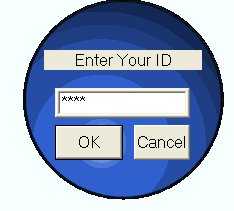
(reference UltraVnc Single Click - Helpdesk.txt)
Re: Using SC with PC Helpware features
Thank you for the reply YY, you've definately proven me wrong  .
.
I'll have a look at which of the options we're going to take, to either stick with PcHelpware or to switch to SCIII
.I'll have a look at which of the options we're going to take, to either stick with PcHelpware or to switch to SCIII