| View previous topic :: View next topic |
| Author |
Message |
JDaus
SCPrompt & VNC2Me Dev
Joined: 2007-03-17 11:00 Posts: 499 Topics: 22 Location: Sydney, Australia
|
#1| Posted: 2009-02-26 02:54 Post subject: SCPrompt - SC on Steroids (2K, XP, Vista, 7, 2008) 23/8/10 |
|
|
New Alpha release (26/6/10) - see latest forum posts for details.
SCPrompt
(SCPrompt is released under AGPL and is opensource)
This Project takes the idea of SC to a whole new level with a choice of GUI's, Service Mode, Repeater Connections, Settings Manager and much MUCH more ... read on for details.
This Project was started before the original SC program was updated to support Vista & Win7. It has more features than the original, but if all your looking for is an updated SC then try it out.
Ready-To-Roll (Manual)
Download RTR version
DOWNLOAD THE Manual Version NOW (uses server 1.0.6.4)
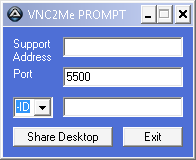
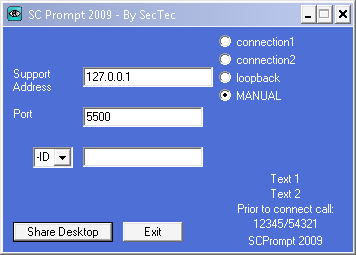
'Manual' SCPrompt application without ID selected
'Manual' SCPrompt application with ID selected (enabling ID input box)
Roll-Your-Own ... (with Builder and Settings Manager)
Download RYO version
Downloads are available from the VNC2Me website
This application (and the associated builder) allows you to create a package to support XP, vista and windows 7 without limitations (see below).
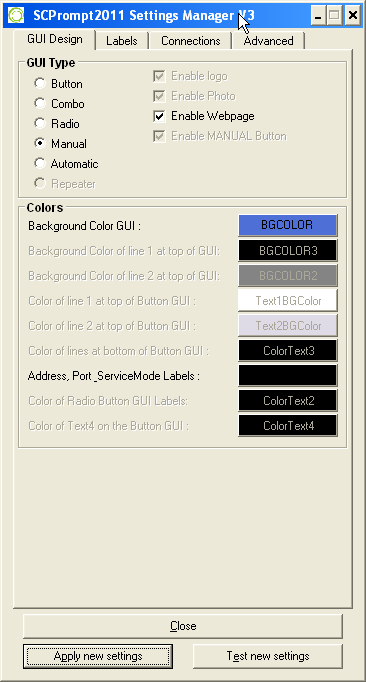
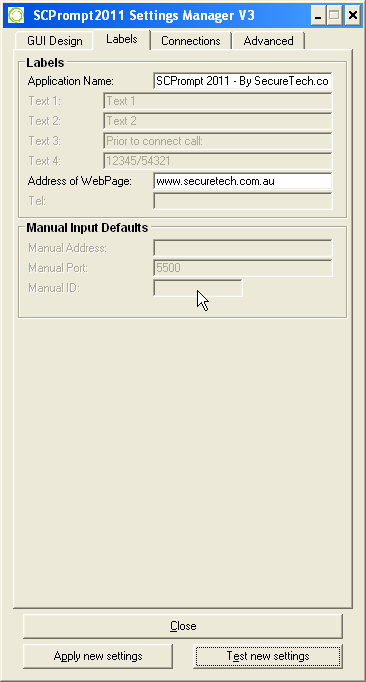
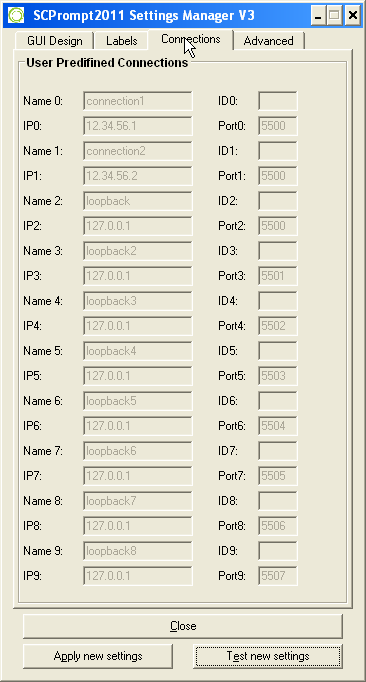
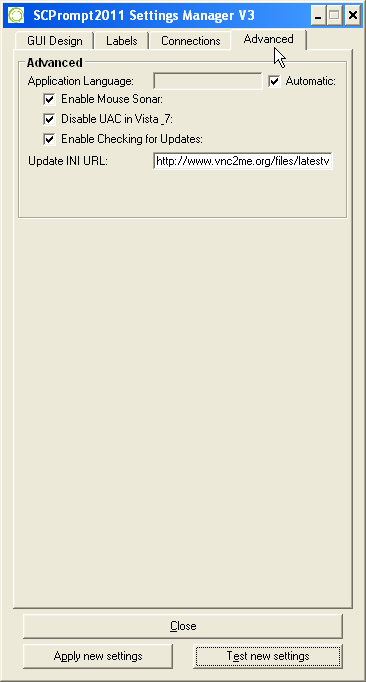
Connection names and settings are read from INI settings (Manual is last in list, unless disabled), so no editing of source code is needed... just setup the INI (using included settings manager), run the builder and send to your clients.
Further customisation could include changing the Logo.ico, changing Logo(x).jpg (for each predefined connection) or manually editing the INI to get more advanced features.
Choose Your own GUI ...
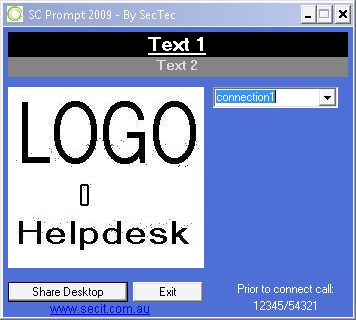
Combo
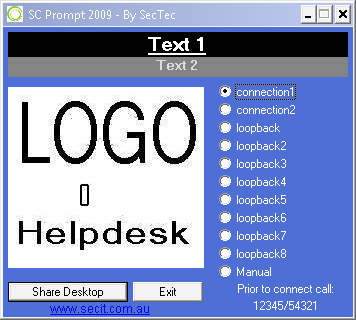
Radio
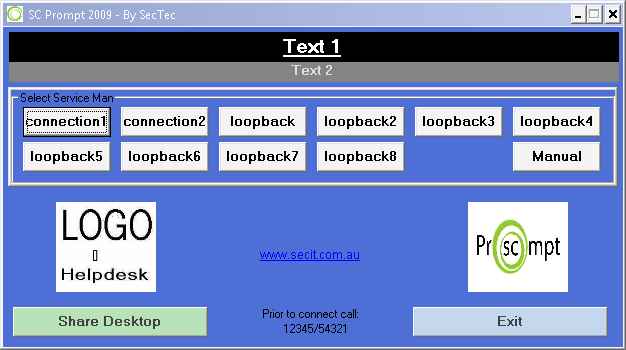
Button
Automatic
Manual Connections are still available (option to disable), but are last in the list ...
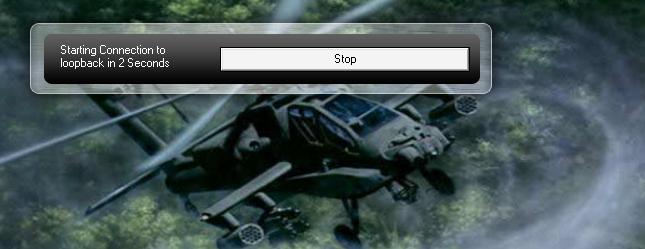
A nice count-down timer (for automatic connection to predefined connections) that has a transparent look, and is done with just two simple images, so it should be easy to customise ...
Different Logo's can be used for each of the predefined connections or a default can be used if that's all you want ... just like above (examples in the RYO package).
each predefined connection can have its own image if wanted (maybe a photo for that personal touch) ... i just modified the original sc image, keeping the same image size ... so you can use your logo from the old SC if you want (after converting to jpg).
Manually altering the "scprompt.INI" settings is fairly simple (if the settings manager doesn't suit your needs), the "scprompt_example.ini" file has some explainations on the settings ...
Setup
See the following post, or the included readme.txt for basic setup instructrions.
Customising
Translation instructions are (nearly) the same as for other vnc2me products, and are fairly easy to follow (i think). Languages will be automatically selected depending on the clients OSLang settings (windows default language) if no translation is found for the OSLang of windows, then Lang_English is selected as the default.
Translations can be shared in reply posts of this forum, or on the vnc2me website (you choice). As new translations are required (due to new features), i will "Private Message" the user who originally translated.
SCPrompt disables Vistas UAC & AERO while running (even while using old SCII version), but issues still surround vista with the OLD SC version, so it is advisable to use the newest server or SC when building.
To use the old SC application (or an updated server version), simply move the "uvnc.exe" from the scprompt directory, and place the SC version into its place. (you can leave it named "winvnc.exe" or rename it to "uvnc.exe")
Improvements
Ability to build your own module using Server 1.0.8.0 (and above) or SCII, SCIII or SC 1.1.0.0 (if size is an issue)
Choose the type of GUI you want to use (ComboBox, Radio Buttons, Push Buttons & automatic countdown timer)
Has native UAC & AERO support on vista & Win7.
Unlimited Predefined Connections (reads from INI)
Desktop wallpaper is restored after application exit. (even if winvnc application closes incrrectly)
MouseSonar is turned on (While scprompt is running), allowing a visual prompt when VNC connection successfully established.
Background color and text color is settable from "scprompt.INI"
customisable Logo?.jpg for each connection (or one for all ... you choose)
GUI Text and all Text Prompts are read from "v2m_lang.INI" & "scprompt.ini", allowing for complete cutomisation
Multiple languages are automatically supported using "OSLang" of client, and above modification (allows you to use one application / download to support multiple languages)
Limitations
UVNC Server 1.0.8.0 (and above) needs settings to be created prior to use (defaults are given, but it is advisable to customise these)
Two or more "SCNames" in the INI cannot be the same (as the first name would be selected from the INI when using certain GUI types)
'Radio' & 'Button' GUI types only support 10 predefined connections
Source Code
All Current & future "Alpha" Releases contain the source code as an application resource, you can use res-hacker to view this. _________________ ask a silly question and remain a fool for 5 minutes...
don't ask, and remain a fool for life
__
JD
VNC2Me - OpenSource Free Remote Screen\Desktop Sharing Solutions
YTS
Last edited by JDaus on 2010-08-23 10:19; edited 19 times in total |
|
| Back to top |
|
 |
JDaus
SCPrompt & VNC2Me Dev
Joined: 2007-03-17 11:00 Posts: 499 Topics: 22 Location: Sydney, Australia
|
#2| Posted: 2009-03-14 12:12 Post subject: Readme, History, Future & Changelog |
|
|
SCPrompt 2009 readme.txt
| Code: | <*> About
<*> Quick Setup
<*> Manually configure
<*> test
<*> build
<*> feedback and future
<*> Changelog
<*> Roadmap
********** ABOUT **********
SCPrompt was a small project that was started by Dwalf back in 2005.
this original project was a very simple application that launched the SC application (with commandline arguments) and then exited
(not waiting for the SC application to error or anything similar)
The updated application now stays running while the connection is running (it just minimises when start button pressed),
and will restart the server if it fails (server has autoreconnection anyway).
In addition to this, the application also offers pre-defined connections, which allow a support person to setup connections for quick use.
the manual part is still available with the pre-defined connections, and is just as easy to use as the orirginal.
New is the ability to select from one of several GUI Types (by setting the GUI_Type in the INI)
********** Quick Setup **********
Running 'Build_SCPrompt_7zip.exe' will prompt you to with the following questions ...
This will Create the 7zip EXE from the scprompt sub-directory, do you wish to continue ???
|___ NO - *EXIT*
|___ YES - have you setup the application using settings manager yet ???
|___ NO - *RUN* 'Settings_Manager.exe' and wait till close - Continue
|___ YES & after 'Settings_manager.exe' - Have you tested your application yet ???
|___ NO - *RUN* 'scprompt\scprompt.exe' and wait till close - Did the application run as expected ???
|___ NO - *EXIT*
|___ YES - Continue
|___ YES - Compress the scprompt directory
|___ OK - Building complete, time to test ...
|___ OK - *RUN* Finished 7zip EXE (scprompt_0.X.X.X.exe) - Exit (no wait)
Suggested path is:
YES
|___ Yes
|___ NO & us settings manager.
|___ NO & test it works as expected.
|___ Check that all needed files are compressed & click OK
|___ OK & check application is setup as required and works correctly.
Distribute application to clients after testing
********** Manual Configure **********
All customisable files are located in the scprompt directory, anything altered outside of this directory is at you own risk ...
Settings_Manager.exe is launched by Build_SCPrompt_7zip.exe (second question) if needed,
and this application creates all the settings that are needed to run scprompt without manually editing any INI files.
scprompt.ini file (scprompt\scprompt.ini)
This file contains many settings that can help people customise the look and feel of scprompt
Logo Files (scprompt\Logo.jpg & scprompt\Logo[X].jpg)
If predefined connections are used, the GUI resizes to allow for Logo images, additonal text labels and inputs to be added.
The Logo Images are the same size as the original SC ones (196 x 181) and can be customised as you see fit.
If Logo.jpg file exists (and pre-defined connections setup), it is loaded on application start
(or if no connection specific Logo[X].jpg file can be found).
No Image File (scprompt\NoImage.jpg)
If Logo files are not available, a NoImage file can be setup (is included in this RYO distrobution).
Selectable GUI_type
The scprompt.INI contains the ability to setup several different types of GUI:
1) scprompt Original (similar to the original)
2) scprompt Combo (has a drop-box with predefined connections listed in it and manual {optional})
3) scprompt Radio (has radio items for the predefined connections and manual {optional})
4) scprompt Button (has big easy-to-press buttons for the predefined connections)
5) scprompt connect (has a count-down timer window that automatically connects to whatever predefined connection you want)
GUI #1 can be enabled by setting UsePredefined=0 within the scprompt.INI (SC Section)
GUI #2 can be enabled by setting UsePredefined=1 within the scprompt.INI (SC Section) and GUI_Type=Combo within the scprompt.INI (GUI Section)
GUI #3 can be enabled by setting UsePredefined=1 within the scprompt.INI (SC Section) and GUI_Type=Radio within the scprompt.INI (GUI Section)
GUI #4 can be enabled by setting UsePredefined=1 within the scprompt.INI (SC Section) and GUI_Type=Button within the scprompt.INI (GUI Section)
Automatic Connections (GUI #5 above)
The application can be setup to automatically connect to a pre-defined connection (gives a count down timer for 5 seconds with a stop button)
this is done using commandline arguments "-c [X]" where [X] is the predefined connection number.
eg "-c 0" connects to the first connection
eg "-c 1" connects to the second connection, and so on...
the testing builder is setup to ask for commandline arguments. If none are needed, ignore this option.
********** Testing **********
The Builder gives the option to run the application during the build process.
If this test is unsuccessful, you can close the builder before actually building the distrobution app.
All testing is done by starting the application either normally (by double clicking on the app in the scprompt directory)
or by using the command prompt to change directory (cd) into the scprompt directory and run the arguments required (eg "scprompt -c 0")
********** Build **********
there are two options when building:
1) Build_SCPrompt_7zip.exe
2) build_with_7zip.cmd
Option 1) is the new "Build_SCPrompt_7zip.exe" executable which is a multipurpose 7zip self executing exe builder
(customised by using "Build_7z_exe.ini"). this is a fairly simple builder which is very crude, but it works well for most people (at least those that have commented).
This uses the build_resources\7-zip32.dll & build_resources\7z_v2m.sfx & build_resources\upx.exe but builds its own temp\sfx_config.txt file from the options in INI (or asked of user)
Option 2) is the old school batch script which is left in the package to make it much easier for most people to understand
the build process and customise to their needs. This uses the build_resources\7za.exe & build_resources\7z_v2m.sfx & build_resources\7z_sfx_config.txt
********** Feedback and Future **********
All feedback can be directed to JDaus by means of:
a forum post on ultravnc website (forum.ultravnc.info),
by posting or PM on the vnc2me website (www.vnc2me.org). the choice is yours...
as for the future ... no imediate plans for changing things, but will see what people can come up with, and what i like.
if you want to change something in the source, be my guest, i enjoy seeing where others take my humble beginnings ...
all i ask is that you send me your code, so i can learn how you have done things, and see if i want to include the changes.
enjoy the work i and others have done.
JDaus |
History
I didn't create the original, but I got sick of seeing people create great things only to make it free for home use only and trying to make money by doing small changes to uvnc project, so i sat down one morning and modifed the old SCprompt to accept manual (as the old one did) or pre-configured connections (large amounts of them via combobox dropdown lists).
5 hours later i had the original scprompt2009 version (which has changed alot since then)
Now the application has 4 different types of GUI, and more customisations "than you can poke a stick at" (sorry ... aussie saying)
Future
Released as open source autoit, others can (and have) make their own addons and improvements as needed (please send changes back to me for addition into the main project)
Changlog
SCPrompt Update 2009-04-16
Added manual only version to downloads section.
Latest version has automatic reconnections, GUI has color background and text (read from INI)
SCPrompt Update 2009-05-01
Updated the RYO version to include an improved builder (uses 7-zip32.dll now), also has latest server (1.0.5.7.1) and latest scprompt
SCPrompt (2009-05-29)
commandline option to connect to a specific pre-configured connection
if above pre-configured connection occurs, a nifty count-down GUI appears which allows the person to stop the connection before it starts ...
Disable UAC (or not) options in the INI
SCPrompt (2009-06-30)
CHANGED - Name of the file from winvnc.exe to scprompt.exe (don't know why i made it winvnc originally ...)
CHANGED - "custom" directory to "scprompt" directory.
ADDED - SC_Prompt viewer connection prompting is now supported (can be disabled with INI setting)
ADDED - More debug messages (helps with connection problems)
ADDED - readme in the "root" of the zip file, which explains some stuff (needs improving i know ... testers if you can help out with this, it would be greatly appreciated)
ADDED - scprompt_example.ini with commenting to help explain all current settings
ADDED - _IniReadWrite function which will write new setting into your old INI without changing the previous settings
Added - a small tray menu to allow exit from the tray
FIXED - Builder EXE should now work for all ... but failing this, all files for cmd file are included to allow users to edit things themself, and send me the files that works, so i can update / fix the builder.
FIXED - ComboList now has first connection by default, combolist is also selected on application startup (so using arrow keys to navigate is easy)
FIXED - "Share Desktop" is now the default button, so pressing enter makes a connection to first pre-defined connection.
FIXED - bug with automatic connection countdown timer has been fixed (i hope) so that it should connect just as it does when using the GUI
FIXED - Builder now comes with all files needed (for RYO version)
FIXED - AppName is now able to be set from the INI file
FIXED - Languages now read from the correct INI file
FIXED - Text1, Text2, Text3 & Text4 are now used in both GUIs
FIXED - When another "WinVNC" is already running, we try to kill it before starting our own app
FIXED - "Server Termination error on viewer ... server now exits cleanly
CHOICE - If you only want one Logo image for all connections, "Logo.jpg" can be used, but if you want one for each (or only some) connections, "Logo[X].jpg" can be used (where [X] is the Predefined Connection number - "Logo0.jpg" is the first connection Image)
CHOICE - NEW GUI - uses the radio buttons, OLD GUI - which uses the DropList method is available with just a INI setting change.
SCPrompt Update 2009-07-21
Updated the Manual version to use the same app versions as the RYO version ...
Updated the first post to reflect the changes made in the latest release version of the application.
SCPrompt Update 2009-07-28
Added Source Code package to the downloads
Updated the first post to reflect changes.
SCPrompt (2009-08-10)
Added Button GUI
SCPrompt 0.9.8.29 (2009-08-16)
Added - compatablity to New UVNCSC (INI option to use server if that is still required). This saves 270KB in final app. (JD)
Added - Better support for multiple languages in one GUI, by making most of the TEXT from scprompt.ini being read from the v2m_lang.ini (if exists in v2m_lang, this setting is used)
Added - UpdateURL is now an INI option, allowing companies (or individuals) to notify users when updates are available for their custom app (JD)
Added - NoImage.jpg photo image works if logoX.jpg file doesn't exist (pheonix)
Changed - INI Sections added to simplify manual editing. (JD)
Changed - Settings Manager Updated to use all latest settings and Features (Pheonix)
Changed - ALL GUI's Updated with top text (pheonix)
Fixed - Bugs in Button GUI sorted (pheonix & JD)
SCPrompt 0.9.9.30 (2009-09-24)
Source is now included in all Alpha releases as a resource (open reshacker, and take a look around) - will try to remember to remove for betas ...
Added TraySetStateShow ([GUI] Section) 'readonly' INI setting that allows flexability icon displaying (showing, flashing or even hiding) - these should be set to the appropriate number for the AutoIT 'TraySetState()' function
Added TraySetStateFlash ([GUI] Section) 'readonly' INI setting that allows flexability icon displaying (showing, flashing or even hiding) - these should be set to the appropriate number for the AutoIT 'TraySetState()' function
Added AppReRunTimer ([Common] Section) 'readonly' INI setting that allows flexability in re-runnning the vnc server after it closes. (default 30 seconds)
App now waits 30 seconds (default - see above timer setting) before starting the icon tray flashing ... (bi-product of above coding ... but i like it)
Added autoreconnect ([Common] Section) 'readonly' INI setting that allows users to disable the automatic reconnection feature if required
Added Encryption support if fileexists(MSRC4Plugin.dsm) in the same directory and UseSC_Server = 0 (untested)
Added Translations & fixed the v2m_lang.ini file format
SCPrompt 0.9.10.32 (2009-10-01)
Added 0.9.9.31 to downloads page.
SCPrompt 0.9.10.32 (2009-10-06)
Added Service Mode to Combo & Radio GUI's
SCPrompt 0.9.10.33 (2009-10-18)
- Fixed Repeater connections with double colon "::" problem (REF: $Use_UVNC_Connect_Colon)
- Fixed Button GUI alignments & sizes
- Added [Common]RemoteINI setting to INI (allows getting scprompt.ini from HTTP, HTTPS or SMB locations for easy updates of configurations (REF: $RemoteINI)
- Added and changed eventlog settings so more info is logged if needed (if $DebugLevel = 9 maximum, if $DebugLevel = 1 minimal logging) (REF: V2M_EventLog(), $DebugLevel)
- Changed 'Service Mode' to use existing UltraVNC install when installed (instead of trying to install a new one over the existing, and removing it when finished) (REF: _VNCRun(), _VNCServiceMode()$YTS_ServiceMode, $UVNC_ExistingService, $UVNC_ServiceRegRead, $YTS_AdminCheckbox)
SCPrompt 0.9.11.34 (2009-11)
- Added checks for @ExitCode in OnAutoitExit() to add startup icon if windows shutdown or logoff detected, otherwise, looks for startup icon and removes on normal exit.
- Updated VISTA code to support Win7 and future versions of windows.
SCPrompt 0.9.12.35 (2009-12)
- Added Service Mode to MinGUI
- Added Translation for "Service Mode"
SCPrompt 0.10.1.36 (2010-01)
- Fixed _Language() function to allow manual override of automatic language selections
- Added "-sm X" cmdline arguement to change servicemode checkbox (and usage) to be checked (1) or not (0). was a feature request. (X is either 0 or 1)
- Added EventLog() function to the builder to help better diagnose problems.
SCPrompt 0.10.5.38 (2010-05)
- Added Iexpress options to builder, allowing for better WIN_7 integration.
- Fixed Several
SCPrompt 0.10.6.40 (2010-06)
- Added Several Settings to Translation System
- Added "Tools" TrayMenu with several options:
1) "Force Remove" - Uninstalls current Service & removes service_commandline from the Ultravnc.ini in the service directory
2) "Driver Install" - is not yet functional, but will install mirror driver upon detection of no.
3) "Check for Updates" - is designed to allow users to check for updates easily from the traymenu. (use update URL setting in INI to setup your own update INI location.
- "Service Mode" Has been reworked, allowing better integration & error handling.
- FIXED problem with building using IEpress "Not including last file"
- FIXED "-debuglog" commandline option should work properly now. Will also try to delete the log file on running application with debuglog option set (via commandline or hard coded).
SCPrompt 0.10.8.41 (2010-08)
- Fixed Logo resizing issue when switching from manual back to predefined (Radio GUI)
- Fixed sc_prompt bug which made no prompt appear at the viewer.
- Added "TRAYTIP_CONFIG_DOWNLOAD" to the translation system for when scprompt.ini is downloaded from a website or network share.
Builder 0.9.10.17 (2009-10-23)
Added ability to change ICON of finished 7zip.exe
********** Roadmap (future features) **********
0.9.11.3X
- Add eventlog to the builder (with cmdline option and traymenu option to log the events)
- Add TrayMenu item for install of UVNC Drivers (if possible, detect if installed first)
- Add [Common]ExitAfterRun & [Common]ResetExitAfterMinutes _________________ ask a silly question and remain a fool for 5 minutes...
don't ask, and remain a fool for life
__
JD
VNC2Me - OpenSource Free Remote Screen\Desktop Sharing Solutions
YTS
Last edited by JDaus on 2010-08-25 02:42; edited 5 times in total |
|
| Back to top |
|
 |
Gaspode
Joined: 2009-03-14 09:50 Posts: 3
|
#3| Posted: 2009-03-14 12:39 Post subject: Re: SCPrompt 2009 Version (Vista Capable with limitations) |
|
|
(discussion moved from pm)
| Quote: | | Quote: | Gaspode wrote:
... no new exe file is generated. |
It actually re-generates the "custom.exe" application ... take a look in your temp directory, and tell me if it generates a new file when you run the "Build_VNC2Me_SC_7zip.exe" app (and if so, the file size) |
We may be getting somewhere. I'm running Vista on this computer and if i run it by doubleclicking the icon (no admin rights) it does not generate anything. however if i run it from a prompt with admin rights it does generate a new custom.exe. the custom.exe in the temp folder is 575357 bytes. When running this, or the new custom.exe in the main folder i get a 7zip error saying (in norwegian) File not found.
| Quote: | | Quote: | Gaspode wrote:
Are there any dependecies not included in the SCprompt 2009 download?
| Not that i know of, but it was put together in 4 hours ... so probably ... sorry |
Anyone contrubuting to the community have nothing to be sorry about.
| Quote: | | Quote: | Gaspode wrote:
I see some of the .ini files referencing files set to hardcoded paths E: which ofcourse does not reside on e: on my computer nor can i find the files in the package i downoaded.
| if this file is "ultravnc.ini" then you can delete it, as its not necesary, and was used while i tested the uvnc server instead of SC ... which doesn't work ... |
I am talking about build-resources\reshacker.ini
| Quote: | | Quote: | Gaspode wrote:
I noticed you wanted people to translate, and i'd be more than happy to supply a Norwegian translation (when i get it working) Very Happy |
these sort of coments / questions should be posted publicly on the forum, email addresses and the like are for PM's ... please post your question on the forum, and i will reply there, so everyone can learn from the questions ... |
And here we are  _________________ --
Lars |
|
| Back to top |
|
 |
JDaus
SCPrompt & VNC2Me Dev
Joined: 2007-03-17 11:00 Posts: 499 Topics: 22 Location: Sydney, Australia
|
#4| Posted: 2009-03-14 13:19 Post subject: Re: SCPrompt 2009 Version (Vista Capable with limitations) |
|
|
ok, now we are getting somewhere ...
i will update the building app to request admin rights, as this is obviously needed.
hmmm ... the 7zip error apears to be because the "7z_sfx_config.txt" is not setup correctly, or not being included into the exe (with the 7z archive, and sfx)
try this little cmd file ...
| Code: | @echo off
title Creating VNC2Me Package, using 7zip method
cls
echo this script will create the VNC2Me package using 7zip method.
echo.
echo consult the readme or website before running for the first time.
echo.
echo if you do not want to build this package now,
echo press ctrl + c NOW
echo.
echo else,
pause
cls
del temp\VNC2Me_7zip.7z
build_resources\7za a temp\VNC2Me_7zip.7z custom\*.*
copy /b build_resources\7z_v2m.sfx + build_resources\7z_sfx_config.txt + temp\VNC2Me_7zip.7z temp\VNC2Me_7zip.exe
build_resources\upx -9 -f -k -o VNC2Me_SC_7zip.exe temp\VNC2Me_7zip.exe
copy temp\VNC2Me_7zip.exe .\ /y
rem copy temp\VNC2Me_7zip.exe "%HOMEDRIVE%%HOMEPATH%\desktop" /y
rem echo VNC2Me_quick.exe has been placed on your desktop ...
pause | This may need to be modified as its from vnc2me, and not the app your using ... but it should at least help. (its what the build app does)
*edit 15/3/09 - changed batch as pointed out in post below _________________ ask a silly question and remain a fool for 5 minutes...
don't ask, and remain a fool for life
__
JD
VNC2Me - OpenSource Free Remote Screen\Desktop Sharing Solutions
YTS
Last edited by JDaus on 2009-03-15 01:32; edited 1 time in total |
|
| Back to top |
|
 |
Gaspode
Joined: 2009-03-14 09:50 Posts: 3
|
#5| Posted: 2009-03-14 13:59 Post subject: Re: SCPrompt 2009 Version (Vista Capable with limitations) |
|
|
Success!
| Code: |
del temp\VNC2Me_7zip.7z
build_resources\7za a temp\VNC2Me_7zip.7z custom\*.*
copy /b build_resources\7z_v2m.sfx + build_resources\7z_sfx_config.txt + temp\VNC2Me_7zip.7z temp\VNC2Me_7zip.exe
build_resources\upx -9 -f -k -o VNC2Me_SC_7zip.exe temp\VNC2Me_7zip.exe
|
By doing this at commandpromt in SCPrompt_custom folder and with admin rights i have generated a working VNC2Me_7zip.exe (well, not tested with viewer, but hey..) The only change from what JD supplied was the change of the name of the folder to custom (in red)
I have edited the Finish.txt and Start.txt but can't find that they are used anywhere?
How can i change the window title? _________________ --
Lars |
|
| Back to top |
|
 |
JDaus
SCPrompt & VNC2Me Dev
Joined: 2007-03-17 11:00 Posts: 499 Topics: 22 Location: Sydney, Australia
|
#6| Posted: 2009-03-15 10:09 Post subject: Re: SCPrompt 2009 Version (Vista Capable with limitations) |
|
|
At the moment, all text is hard coded into the application ... i will setup to use an INI when time ...
finish.txt and start.txt are not implemented yet ...
thanks for letting me know about the problems building (using the EXE) in vista ... it will obviously require more investigation
i wanted to get the functionality of the program (and building app) working first, then added things like the translations and start/finish notes after its working properly ... let me know how you go with your testing of the app.
it should disable UAC, but not aero (i will get that working when time) _________________ ask a silly question and remain a fool for 5 minutes...
don't ask, and remain a fool for life
__
JD
VNC2Me - OpenSource Free Remote Screen\Desktop Sharing Solutions
YTS |
|
| Back to top |
|
 |
Gaspode
Joined: 2009-03-14 09:50 Posts: 3
|
#7| Posted: 2009-03-15 18:46 Post subject: Re: SCPrompt 2009 Version (Vista Capable with limitations) |
|
|
Thank you for your great work and community contributions jdaus. I'm looking forward to the next release.
The initial test connecting scprompt wasnt quite successful both the sc and the viewer side totally freaked out. The viewer side (where i was) uvnc opened dialog boxes continuosly until it was closed on the sc side. This seemed to be caused by non matching encryption settings, I had the same result with the standard sc build.
Without encryption the standard sc worked perfectly.
I'm expecting scprompt to work perfectly as well as soon as i get the encryption sorted. _________________ --
Lars |
|
| Back to top |
|
 |
JDaus
SCPrompt & VNC2Me Dev
Joined: 2007-03-17 11:00 Posts: 499 Topics: 22 Location: Sydney, Australia
|
#8| Posted: 2009-03-15 22:18 Post subject: Re: SCPrompt 2009 Version (Vista Capable with limitations) |
|
|
| Gaspode wrote: | This seemed to be caused by non matching encryption settings, I had the same result with the standard sc build.
Without encryption the standard sc worked perfectly.
I'm expecting scprompt to work perfectly as well as soon as i get the encryption sorted. | hmm ... sounds like you need to test it locally first to get it to work (try testing on loopback (ie sc connect to 127.0.0.1) ... that way you can be server and client ... makes debugging much easier ...
also, i tested the SCPROMPT app with windows 7, and had no issues building it ... will test with vista when i get it installed, but at this stage i am thinking it may be something to do with language support, rather than core OS issues ... but i will have to wait to install vista to test that theory ... at least you could build it with the script i had ... thats a start ...
anyone know where i can download home premium ISO ... have key for that, so it would be best to use it rather than other versions with cracked key ... _________________ ask a silly question and remain a fool for 5 minutes...
don't ask, and remain a fool for life
__
JD
VNC2Me - OpenSource Free Remote Screen\Desktop Sharing Solutions
YTS |
|
| Back to top |
|
 |
lwc
Joined: 2006-08-08 11:00 Posts: 22 Topics: 3
|
#9| Posted: 2009-03-24 12:39 Post subject: Re: SCPrompt 2009 Version (Vista Capable with limitations) |
|
|
If you're making a new version, why don't you fix the old version's bug of leaving registry traces in:
| Code: | HKEY_CURRENT_USER\Software\ORL\VNCHooks\Application_Prefs |
| JDaus wrote: | | i take it not one person is interested in this ??? |
How can you expect the same response when the previous poster's version was a simple plug and play prompter, while your version forces us to built it ourselves?
| JDaus wrote: | | I got sick of seeing people create great things only to keep it free for home use only and trying to make money by doing small changes to a large project |
I am surprised that someone who claims that forces us to leave his prompter displayed all the time instead of vanishing with a "are you sure you want to continue this connection?" message after it's used, like in the previous version? I am shocked someone who claims that makes his prompter pop up a commercial for TeamViewer on the controller's screen after the connection is over. |
|
| Back to top |
|
 |
JDaus
SCPrompt & VNC2Me Dev
Joined: 2007-03-17 11:00 Posts: 499 Topics: 22 Location: Sydney, Australia
|
#10| Posted: 2009-03-25 11:57 Post subject: Re: SCPrompt 2009 Version (Vista Capable with limitations) |
|
|
| lwc wrote: | If you're making a new version, why don't you fix the old version's bug of leaving registry traces in:
| Code: | HKEY_CURRENT_USER\Software\ORL\VNCHooks\Application_Prefs |
| there is no code in scprompt (original or new) that creates such a registry setting (it may be the UVNC SC app itself)
| lwc wrote: | | How can you expect the same response when the previous poster's version was a simple plug and play prompter, while your version forces us to built it ourselves? | Good point, i will provide a pre-built version for easy use ...
| lwc wrote: | | JDaus wrote: | | I got sick of seeing people create great things only to keep it free for home use only and trying to make money by doing small changes to a large project |
I am surprised that someone who claims that forces us to leave his prompter displayed all the time instead of vanishing with a "are you sure you want to continue this connection?" message after it's used, like in the previous version? I am shocked someone who claims that makes his prompter pop up a commercial for TeamViewer on the controller's screen after the connection is over. | sorry i am confused by what your saying ... there is no advertising in any of my products, i code for myself, not for profit ... if you can take screen shots of what your talking about, or explain it better, without the anger in your post, i will see what i can do to help ... _________________ ask a silly question and remain a fool for 5 minutes...
don't ask, and remain a fool for life
__
JD
VNC2Me - OpenSource Free Remote Screen\Desktop Sharing Solutions
YTS |
|
| Back to top |
|
 |
lwc
Joined: 2006-08-08 11:00 Posts: 22 Topics: 3
|
#11| Posted: 2009-03-29 12:46 Post subject: Re: SCPrompt 2009 Version (Vista Capable with limitations) |
|
|
| JDaus wrote: | | lwc wrote: | If you're making a new version, why don't you fix the old version's bug of leaving registry traces in:
| Code: | HKEY_CURRENT_USER\Software\ORL\VNCHooks\Application_Prefs |
| there is no code in scprompt (original or new) that creates such a registry setting (it may be the UVNC SC app itself) |
True, but the prompter should delete it nonetheless.
| JDaus wrote: | | sorry i am confused by what your saying ... there is no advertising in any of my products, i code for myself, not for profit ... if you can take screen shots of what your talking about, or explain it better, without the anger in your post, i will see what i can do to help ... |
There's no anger. Here are screenshots:
1) This is what the controller sees when the controlled party terminates the connection:
2) This is what the controller sees when the he/she him/herself terminates the connection. All hell breaks loose due to the re-connection attempts...

Last edited by lwc on 2009-03-29 12:47; edited 1 time in total |
|
| Back to top |
|
 |
JDaus
SCPrompt & VNC2Me Dev
Joined: 2007-03-17 11:00 Posts: 499 Topics: 22 Location: Sydney, Australia
|
#12| Posted: 2009-03-29 22:26 Post subject: Re: SCPrompt 2009 Version (Vista Capable with limitations) |
|
|
1) the advertising your talking about is part of the viewer, and not part of scprompt or sc
2) the registry settings I will look into, should be able to check if exist beforehand, and delete after if not ...
3) I will make the autoreconnect off by default, then if you want it, enable via INI value ... (somehow)
this should solve most of your problems, but this will take time, as i'm busy coding other things at the moment, paid projects  _________________ ask a silly question and remain a fool for 5 minutes...
don't ask, and remain a fool for life
__
JD
VNC2Me - OpenSource Free Remote Screen\Desktop Sharing Solutions
YTS |
|
| Back to top |
|
 |
lwc
Joined: 2006-08-08 11:00 Posts: 22 Topics: 3
|
#13| Posted: 2009-03-31 09:12 Post subject: Re: SCPrompt 2009 Version (Vista Capable with limitations) |
|
|
| JDaus wrote: | | 1) the advertising your talking about is part of the viewer, and not part of scprompt or sc |
So why doesn't it appear in the other version?
| JDaus wrote: | | 3) I will make the autoreconnect off by default, then if you want it, enable via INI value ... (somehow) |
That's not a real solution. What it should do is only re-connect if the disconnection wasn't wanted (i.e. not initiated by a button press).
Last edited by lwc on 2009-03-31 09:13; edited 1 time in total |
|
| Back to top |
|
 |
gregorys
Joined: 2009-04-03 04:32 Posts: 1
|
#14| Posted: 2009-04-03 04:39 Post subject: Re: SCPrompt 2009 Version (Vista Capable with limitations) |
|
|
JDaus...
Is there anything I can do to help.
I've currently got Nitr0's build, but I need to build a new one, and there are some things I don't particularly care for with Nitr0's version...
I certainly don't have a huge amount of time to toss, but I'd be glad to help where I can. (I'm a sysadmin consultant type, about 20 years of exp behind me, so I hope I can be helpful.)
Thanks for your work!
-Greg
Last edited by gregorys on 2009-04-03 15:46; edited 1 time in total |
|
| Back to top |
|
 |
JDaus
SCPrompt & VNC2Me Dev
Joined: 2007-03-17 11:00 Posts: 499 Topics: 22 Location: Sydney, Australia
|
#15| Posted: 2009-04-03 12:38 Post subject: Re: SCPrompt 2009 Version (Vista Capable with limitations) |
|
|
thanks for your post greg, I am in the process of getting vnc2Me able to do direct connections by using buttons and predined connections, so that may be of more help to you.
in the interim, you could add your voice to the feature request I made.
this would allow projects such as this one to use the latest server, without modification, to allow for better suport in vista...
PS, you should edit your post and remove the email address mate, PM me with it, then it isn't public knowledge ... _________________ ask a silly question and remain a fool for 5 minutes...
don't ask, and remain a fool for life
__
JD
VNC2Me - OpenSource Free Remote Screen\Desktop Sharing Solutions
YTS |
|
| Back to top |
|
 |
JonD
Joined: 2006-12-24 16:46 Posts: 9 Location: Canada
|
#16| Posted: 2009-04-07 17:09 Post subject: Re: SCPrompt 2009 Version (Vista Capable with limitations) |
|
|
I've been using your "manual" version with great success for helping family and friends (I don't have a static address).
Unfortunately, the version I've downloaded has issues with Vista.
I've read elsewhere that Vista and UVNC have issues that have been addressed. Is there a "manual" version that handles Vista?
Thanks for a great version,
JonD |
|
| Back to top |
|
 |
Bill H
Joined: 2008-12-04 20:28 Posts: 16 Topics: 1 Location: Calgary, Alberta, Canada
|
#17| Posted: 2009-04-15 20:35 Post subject: Re: SCPrompt 2009 Version (Vista Capable with limitations) |
|
|
I have been trying to set SCPrompt up to use encryption, but cannot make the connection. I have been working under two assumptions: (A) a SSH Tunnel is NOT required - (B) The pugin can be enabled within ultravnc.ini.
Can anyone give me some pointers as to the way SCPrompt should be set up to use encryption? I can see on loopback that a connection attempt is being made, but get the plugin error message after pressing cancel.
Any help would be appreciated. |
|
| Back to top |
|
 |
JDaus
SCPrompt & VNC2Me Dev
Joined: 2007-03-17 11:00 Posts: 499 Topics: 22 Location: Sydney, Australia
|
#18| Posted: 2009-04-16 05:26 Post subject: Re: SCPrompt 2009 Version (Vista Capable with limitations) |
|
|
| JonD wrote: | | Unfortunately, the version I've downloaded has issues with Vista. | There is a new version available for download from the site (pre-packaged and ready-to-roll) that uses the latest version of UVNC server (1.0.5.6 at time of writing). this should solve your problems
| Bill H wrote: | | I have been trying to set SCPrompt up to use encryption, but cannot make the connection. | sorry ... forgot about encryption, will add support unto UVNC part of VNC2Me shortly ... and give a reply when its done ... _________________ ask a silly question and remain a fool for 5 minutes...
don't ask, and remain a fool for life
__
JD
VNC2Me - OpenSource Free Remote Screen\Desktop Sharing Solutions
YTS |
|
| Back to top |
|
 |
JDaus
SCPrompt & VNC2Me Dev
Joined: 2007-03-17 11:00 Posts: 499 Topics: 22 Location: Sydney, Australia
|
#19| Posted: 2009-04-16 21:23 Post subject: Re: VNC2Me SCPrompt 2009 (Vista Capable - using server 1.0.5 |
|
|
OH!
i nearly forgot to thank @byte for the code contributions/changes submitted ... although not exactly what i had in mind, it is great when take my source, and adapt it to their needs... it also prompted me to add some colours.
also ...
for those worried about viruses, i did a scan using virus total (two actualy) here is the results for the currently uploaded file ...
http://www.virustotal.com/analisis/3240ff1a1e073f709391fddabf5ea044
the result differes if i leave out the "include source as resource" option when creating the app... when i do that ... this happens
http://www.virustotal.com/analisis/8ec4bf37fbee94ca96cd3db556e05acb
hopes this helps those that are worried about viruses (or curious) _________________ ask a silly question and remain a fool for 5 minutes...
don't ask, and remain a fool for life
__
JD
VNC2Me - OpenSource Free Remote Screen\Desktop Sharing Solutions
YTS
Last edited by JDaus on 2009-04-16 21:28; edited 1 time in total |
|
| Back to top |
|
 |
JonD
Joined: 2006-12-24 16:46 Posts: 9 Location: Canada
|
#20| Posted: 2009-04-16 21:48 Post subject: Re: VNC2Me SCPrompt 2009 (Vista Capable - using server 1.0.5 |
|
|
Probably a silly question... but how do I know I'm downloading the latest. The dates on the website are still the old dates or am I missing something?
edit:
Sorry... found it after all
JonD
Last edited by JonD on 2009-04-17 00:44; edited 1 time in total |
|
| Back to top |
|
 |
|
|
You cannot post new topics in this forum You cannot reply to topics in this forum You cannot edit your posts in this forum You cannot delete your posts in this forum You cannot vote in polls in this forum
|
Portions © 2004-2007 by -=Assarbad=- / v1.7d If you need to contact the forum admins, please use the PM feature or the contact form.
Powered by phpBB © 2001, 2005 phpBB Group
|